

👋 I am sharing the cool AI stuff that I am building. AI for finance/accounting folks (and others who just want to learn AI generally). Follow along and subscribe 👇
My 6-Step Process to Build an Accounting AI Agent
I have been deep building with AI for the past year. Every person (leaders included) needs to be building with AI. It’s important to understand how to use AI, what to expect of your team, and how to rebuild your org for the age of AI.
I built our first AI agent to tackle accounting reconciliations (focused on prepaids initially)
Here is the process I ended up with…
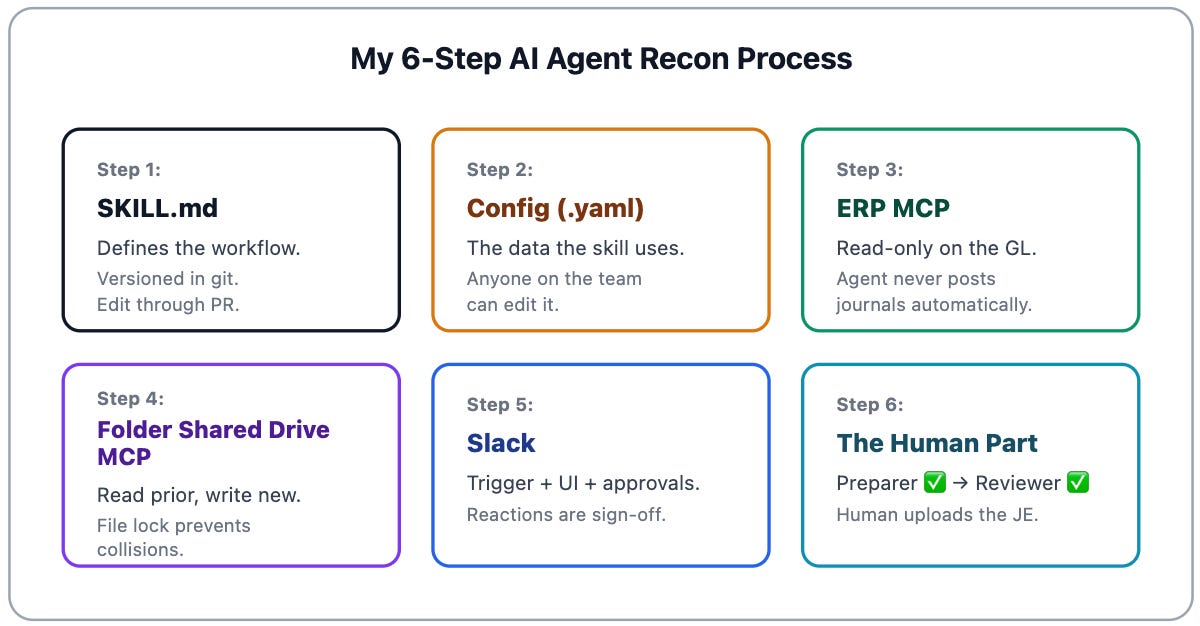
An “agent” is essentially the worker that navigates all of these systems and steps to complete a task.
Step 1: The “Skill” Itself
Skill: A self-contained workflow an agent runs. A system prompt that defines what to do. MCP connectors to the systems it needs. A trigger that kicks it off. A config that drives the behavior. You build it once and it runs forever.
Every skill has a SKILL.md file. The skill defines the inputs, workflows, rules, output, edge cases, etc. My prepaid skill is ~200 lines.
You’re not writing a prompt every time you run it. You’re writing it once. And then updating it if/when something changes.
Step 2: The Config File
My config (yaml file) contains:
Prepaid GL account codes
Vendor → coding map
Materiality threshold
Partial-month convention
Routing: who gets pinged, in which channel
When something changes, you edit the config (not the skill).
This is one thing I was doing wrong before. I was dumping everything into a prompt (or a skill). Every time something changed I would have to update the skill and re-do it.
Having a separate config file with the stuff that might change breaks things up so it’s easier to maintain. It’s like why you don’t put your entire model and all the components in one giant tab or make Excel model formulas huge.
Putting everything in one skill file also makes it so you can’t reuse your skill in other recons, entities, etc because it contains the exact detail for one prepaid recon process. To make it scalable/reusable you separate out those details into the config file. Then you can reuse the skill and just update the config file.
Step 3: MCP Connector to the ERP
MCP (Model Context Protocol): A standard way for an AI agent to plug into your software systems (Deel, NetSuite, Google Drive, etc) so it can read data, do work, and take actions in those systems on your behalf.
A surprisingly large number of companies I talk to still use AI like a simple chatbot.
The biggest unlock comes from giving AI visibility to everything…Only then can AI agents perform meaningful work end-to-end. The primary way to do that is via MCP connectors.
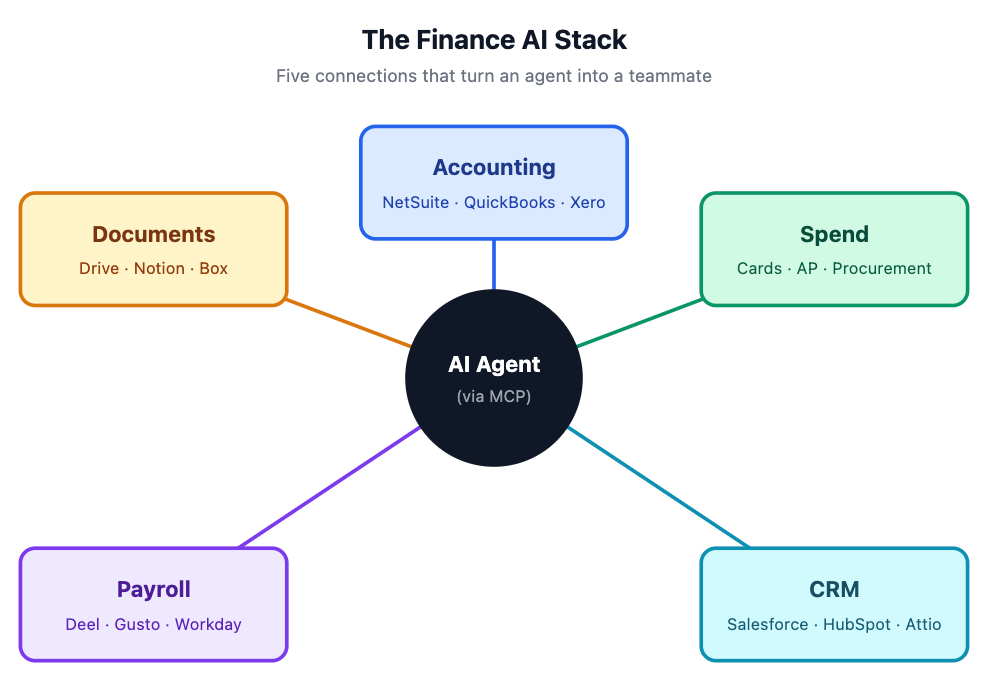
If AI is not connected to all your systems, then it lacks context so it will require a lot more manual human effort for each handoff and coordination. AI needs to “see” all the context and have the ability to take actions (even if read-only) to be really useful.
My prepaid agent queries my ERP GL directly via the MCP. No CSV exports/imports.
The skill I created reads the config file to know which prepaid accounts to pull. The agent calls the ERP connector and pulls current period activity for those GL accounts.
If you don’t have an MCP connector to your ERP, that’s the first thing to fix.
Step 4: MCP Connector to the Shared Drive
The workpapers don’t live in your ERP. They live in GDrive, Box, SharePoint, etc.
The skill needs to:
Read last month’s workpaper
Write the new workpaper to a new file
Enable the AI agent to create and edit the new prepaid workpaper
An MCP connector for the shared drive handles this.
Step 5: Slack Is the Trigger and the UI
Slack is the UI for my AI agent.
Slash command: I kick off the recon by typing “/prepaid April”. Or I just chat in Claude “I want to kick off the prepaid recon for the April” and it will find it.
The agent will find the prior workpaper (location is defined in the config file), copy that workpaper to the current month-end close folder. It will then use that as the starting point for adding new prepaids, adding a new month of amortization, etc. The agent is trained just like a human would be…it brings over Excel formulas just like the prior month so the amortization calculates correctly.
When the agent finishes, it posts a digest with the workpaper, the JE CSV, and a tag for the preparer.
Below is an AI generated Slack example of what I see (done with AI so you don’t see my actual Slack…)
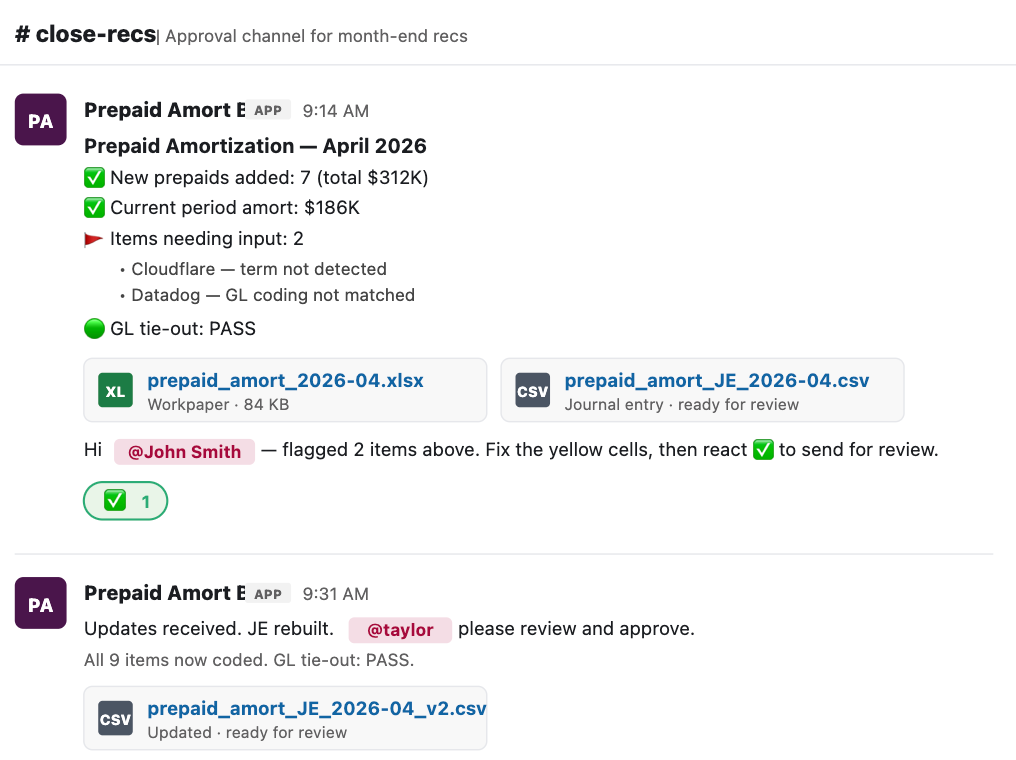
If the AI agent flags something I need to fix, then I’ll do one of two things:
Open up the workpaper and fix the errors/flags (e.g. add the Cloudflare term from the example above) and then I add a ✅ to the thread which signals to the agent that I am done so it re-reads the files to see if I fixed the flags. It updates the files and posts a follow-up message for the reviewer
If the issue will be repeating, then I will update the skill or config files to automatically fix it going forward
Step 6: The Human Part
The skill doesn’t auto-post the JE. We have a human reviewer who then uploads the JE to the ERP from the file the agent created.
We don’t let agents post journals to the GL. At least not yet…
In Summary…
What previously took lots of manual steps (copy workpaper to new location, open up ERP, download detail, update workpaper, create JE upload file, etc) is now 95% completed by our AI agent.
From ~2 hours of human work to ~5 minutes.
It did take longer the first time I ran the reconciliation, but then the team took it and kept iterating and improving the skill and the config to automate more and more. Eventually, you get some major time savings.
And then repeat that across your other recons and you will shave off days from your month-end close…Smaller accounting teams, faster close, less errors, etc
There is a lot more detail behind what we are doing with AI agents in accounting/finance…Subscribe👇 to follow along.
Footnotes:
Have a cool AI use case in finance/accounting? I would love to feature it. Email me at onlycfo@onlycfo.io