
👋 Learn exactly how I am using AI and the things finance leaders should be thinking about. Get your team AI-pilled and forward them this newsletter.
AI Agents for Accounts Receivable
I built an accounts receivable AI agent in <10 minutes. It worked surprisingly well right out of the gate. And it’s only getting better as I fine-tune it.
AR/collections is a near-perfect use case for AI…incredibly boring, repetitive, and requires context from multiple places.
A lot of finance folks think it’s too hard or it requires a lot of technical expertise to build this, but here are some facts about my AI agent:
Built it myself (with ChatGPT) in <10 minutes
Didn’t need to build an app for it
No separate API calls or complex integration work (all within ChatGPT/Claude)
Was immediately useful. And is getting better every day.
I control what gets just drafted to my email versus auto replies. Everything started as email drafts that we reviewed first.
Save your AR/collection team hours every week and keep reading 👇
The Collection/Billing Problem
Invoices get automatically sent from the ERP. And then the ERP has automatic “dunning” reminders for unpaid invoices that look something like the below.
Hello Customer - Your invoice [xxxx] is past due by 30 days. Please provide payment as soon as possible.
But humans have historically handled all the subsequent back and forth with customers, which can take a lot of time…
Customer: “Can you send me the contract and all the outstanding invoices?”
Accountant: Open ERP, find relevant invoices, download invoices, attach them to email. Then open up the CRM, download the relevant contract and then write an email response.
Customer: “Can you send me your W9?”
Accountant: Grab latest W9, attach it, and email a reply
Customer: “We will pay the invoice next Friday.”
Accountant: Read email, updates the collection tracker, turns off automatic dunning notifications for that customer, email a reply that says, “Thanks! I’ll look out for it”
This is where my AI Accounts Receivable agent comes in….
How I Built My Accounts Receivable AI Agent
The Context Layer
The main reason building this only took me 10 minutes is that I already had ChatGPT connections (via MCP) to all the necessary tools. If your AI model doesn’t have context, then you or your IT team needs to do that immediately. You are greatly behind already if you haven’t done this step yet…
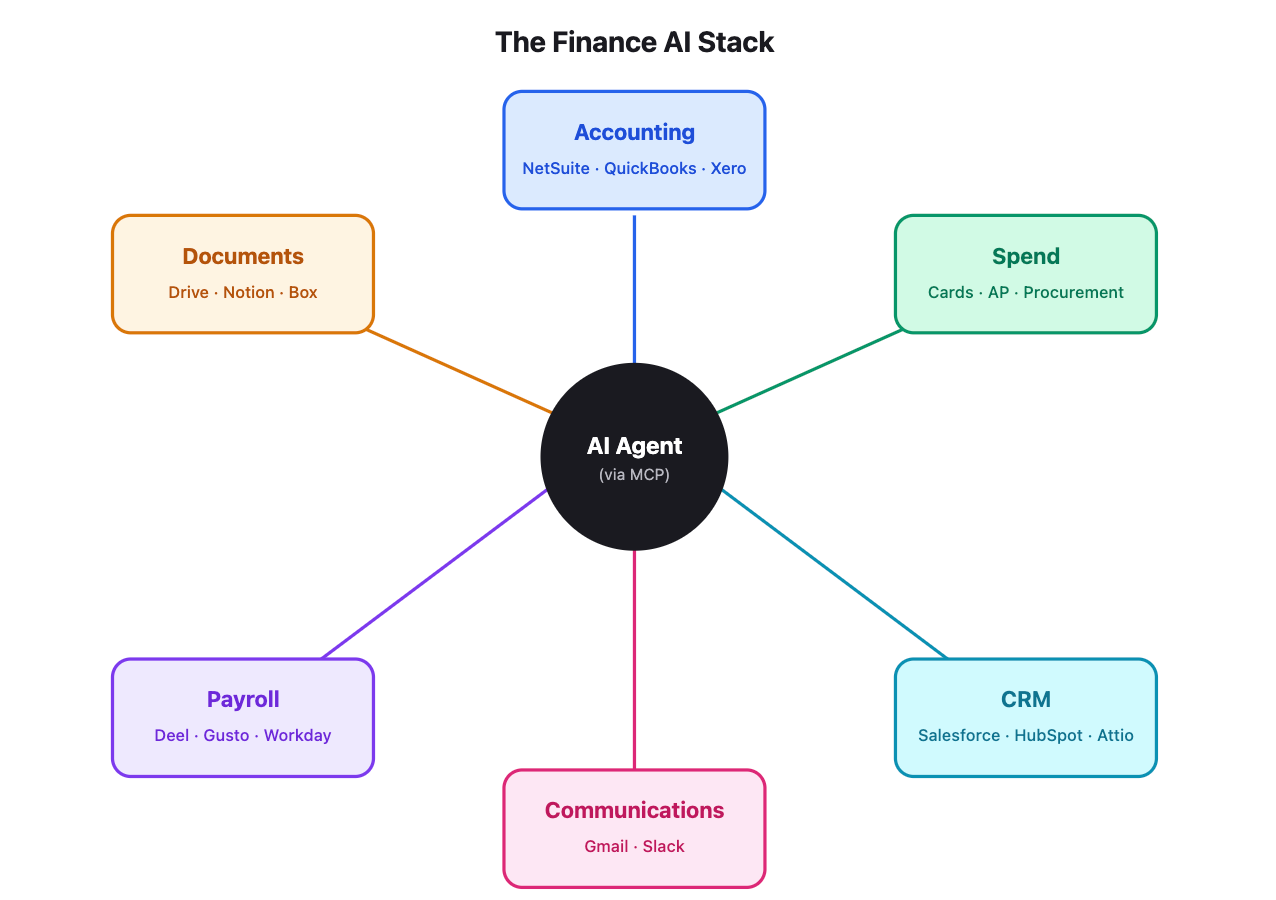
The Initial Prompt
I built the AR agent in ChatGPT’s Codex. Below is my initial prompt.
Prompt: I want to automate billing/collections emails with AI draft replies. The model should already be connected to my email, CRM, ERP, and Slack. Let’s build it so it runs via Codex (not a local or hosted app) and it triggers every 10 minutes via automations so email drafts get pushed to Gmail frequently. There should be controls, guardrails, and email best practices and styling rules that I provide. I want to run the prompt as efficiently as possible. Suggest what to add so I follow best practices.
After the above prompt, ChatGPT asked me a few questions to make sure it was doing the right thing and then it created an “Automation” (see below)

There is no separate app. No need to do additional API calls or other wiring. It’s all done via ChatGPT and the connections that should already be in place.
It’s a simple and very effective way to get started. And probably works perfectly if collections is handled by one person. While you may outgrow this solution eventually, it can work for a long time and it will help create the framework if/when you build an internally hosted app (which adds a lot more complexity). Or it will help you decide what you need if you buy a dedicated tool from a vendor.
How It Works
The AI Wiring
Trigger: “Cron” automation in ChatGPT runs every 10 minutes (while your laptop is open) and fires off instructions.
Automation Instructions: Below are the simple instructions that live in the Automation tab. This initial prompt used call all the other detailed instructions that live in the project folder (which are on my desktop).
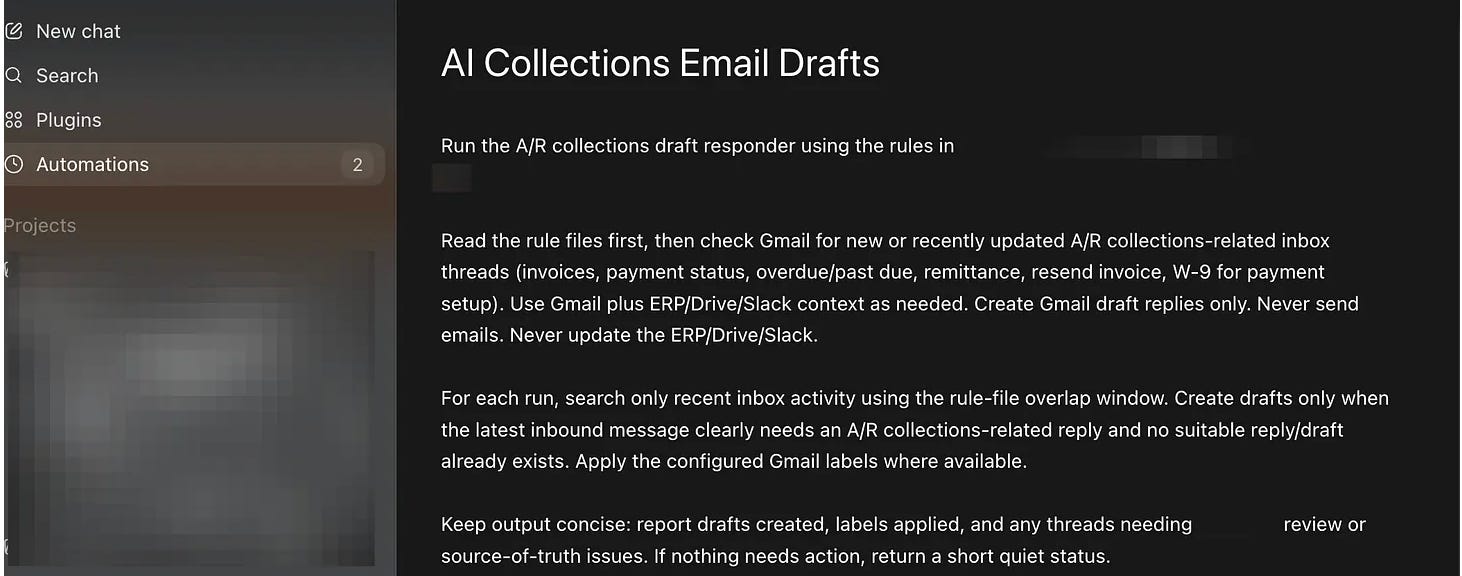
💡 Pro Tip: In the Automations settings you can change your AI model. For something that doesn’t need to be super smart (like collection emails) you can change the model to a less expensive one.
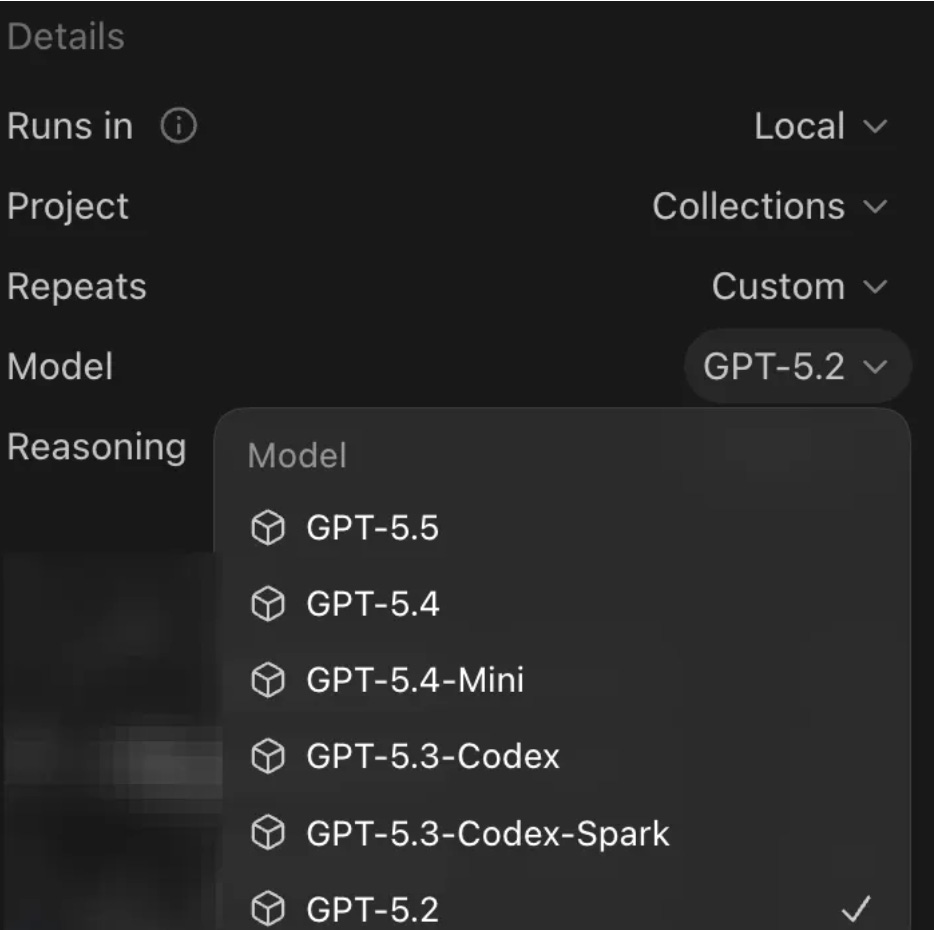
Remaining Instructions: You could put all your instructions in one super long file in the Automation prompt, but that isn’t efficient and it’s hard to track/update. So it’s usually better to break it out. Below are a few different files I have for this:
Email Style (.md file): I provide some general instructions like “Keep it concise and informal.” And then I wrote, “Use the ‘approved replies’ email tag in Gmail for examples to reference when drafting emails”. This means I can improve AI drafting by crafting email responses that I like and tagging the email to “approved replies”. The AI is now instructed to use those emails as examples.
Guardrails (.md file): This is where I document all the rules I want the model to follow. Like “Never send emails automatically. Only draft them into Gmail.” or “Only use the ERP and the facts I provide as a source of truth when drafting emails”.
Runbook (.md file): This file defines when to draft a reply. Like only draft a reply if it relates to collections or billing (don’t draft replies to spam or non-related emails).
Improving AI Responses
Below was a pure AI response automatically drafted to Gmail on an example I set up. The AI model got invoice information from the example in QuickBooks and it grabbed the W9 and invoices from a Google Drive folder (via MCP connector) after confirming the email address was a contact in our ERP.
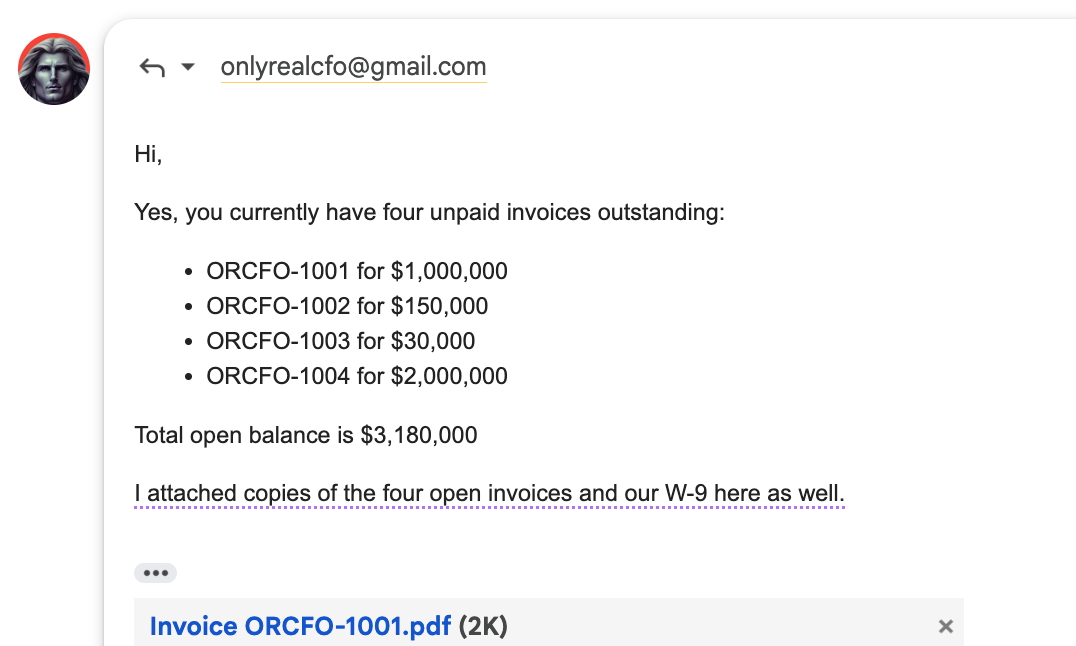
The above AI draft already saved me a bunch of time. It listed out invoices (and attached them all), attached my W9, and drafted the response. But I wanted to change one thing…so I edited it to show the days overdue next to each invoice. I then added this response to the “approved replies” Gmail label so that the AI model will use this as an example for the next similar email.
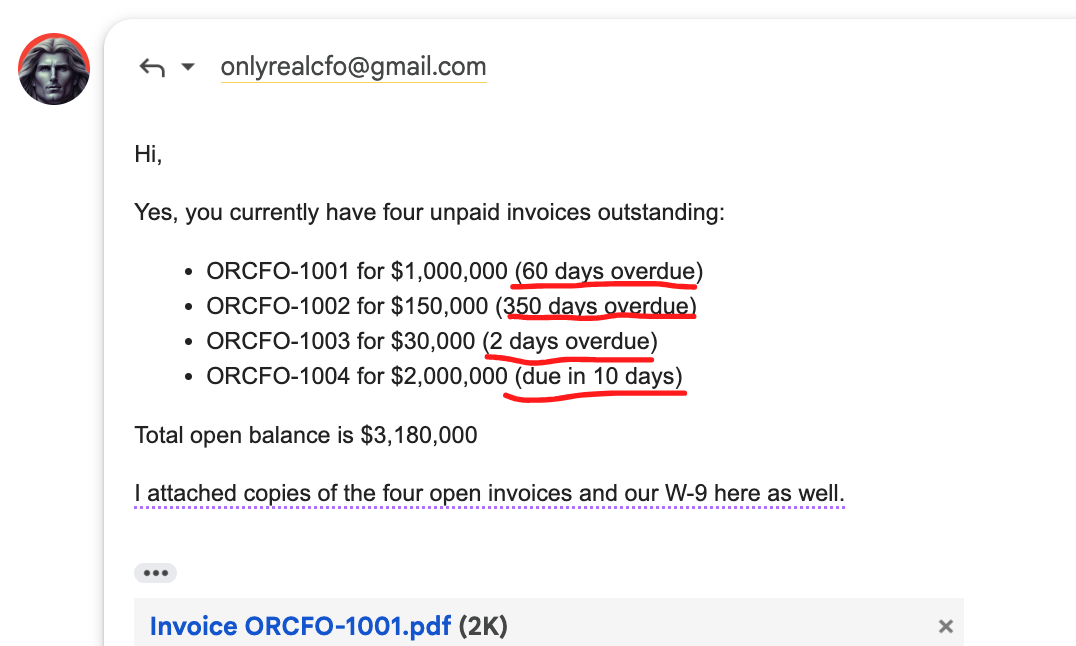
And it did. The next AI email draft response included days overdue…
And if there are other rules, guardrails, style, etc that I want to permanently add later, I will just go into the ChatGPT project and tell ChatGPT what I want and then it will update the necessary files. Easy.
Should You Have AI Auto Reply?
Not at first. Definitely not.
And for certain things, I would never have AI respond automatically. But it certainly can make sense in many circumstances (like a simple request for a W9, invoices, outstanding balances, etc) with the right guardrails in place.
But even if you don’t want to take that risk yet (I totally understand), you can have AI push the email drafts right to your email so replying is 10x faster.
Final Thoughts
The setup I have described is fast and works great when one person is managing collections. But unless you have a large volume of customer billing, one person + AI can probably manage collections for a really long time now.
However, when you need to move beyond one person managing AR emails, then this set up breaks since it is dependent on one person’s laptop and their ChatGPT account.
Building an internally hosted app adds a lot more complications (API calls, security, team-based roles and access, etc). I see a lot of people trying to jump immediately to internally hosted apps when they are working with AI because they think they have to. And then they stop because of the effort and continued maintenance required with complicated hosted apps.
If you decide you need an full-blown app then make sure it’s worth your time. This is the real build vs buy territory. And building an app (and maintaining it) is often still not worth your time. There are lots of great vendors who provide AR AI agents for companies that need more functionality and features.
Start simple.
Footnotes:
Reply to this email if you have any AI use cases you want to share! I’d love to hear what you are building and doing in finance or accounting
Subscribe and forward this newsletter to your team. It will help them leverage AI and be more efficient
Really interesting example of how quickly AI can start reducing repetitive AR workload when the right context and guardrails are in place. The point about keeping humans in the review loop early on is especially important for collections, customer relationships, and maintaining data integrity across O2C processes.