
👋 Join thousands of other finance leaders learning more about AI. I am sharing all the things I (and others) are doing with AI and how you can build an AI-first team/company.
We have all shipped something important only to realize a few minutes after we hit the send button that there was an embarrassing mistake.
Board deck with an internal consistency error
Planning model with a formula error
Financial statement rounding issue
I made a mistake in my OnlyCFO newsletter last week where I accidentally showed Shopify’s stock price falling by over 90% over the past 5 years (in a table with lots of other numbers). It didn’t….Shopify had a 10:1 stock split and my starting stock price was capturing pre-split for some reason. 39,000 of my closest friends saw the mistake….
After being upset for missing a silly error, I realized that I didn’t have the same AI quality checkers for my newsletter as I do in my actual job.
One of my favorite “AI agents" I use all the time is the Finance QA (quality assurance) Analyst.
How To Create a Finance QA Analyst
The Finance QA Analyst has already caught many potentially embarrassing mistakes on board packages and investor updates. I use it every time I put together something important.
If I was using something like this for my newsletter, I would have avoided the embarrassing Shopify price error. I corrected my mistakes and have now implemented a Newsletter QA Analyst to check my work.
*I built my QA Analyst in ChatGPT, but you can do the same things in Claude.
Step 1: Create a Project
Scope projects tightly for the best results. The more you try to combine, the longer the instructions and more chance of AI confusion/errors.
A Board Deck Review project should likely be separate from a Forecast Model project.
Step 2: Feed AI Context
When people complain about the output of AI it is often a context problem. The more context and direction (see next section), the better the output.
Project Sources:
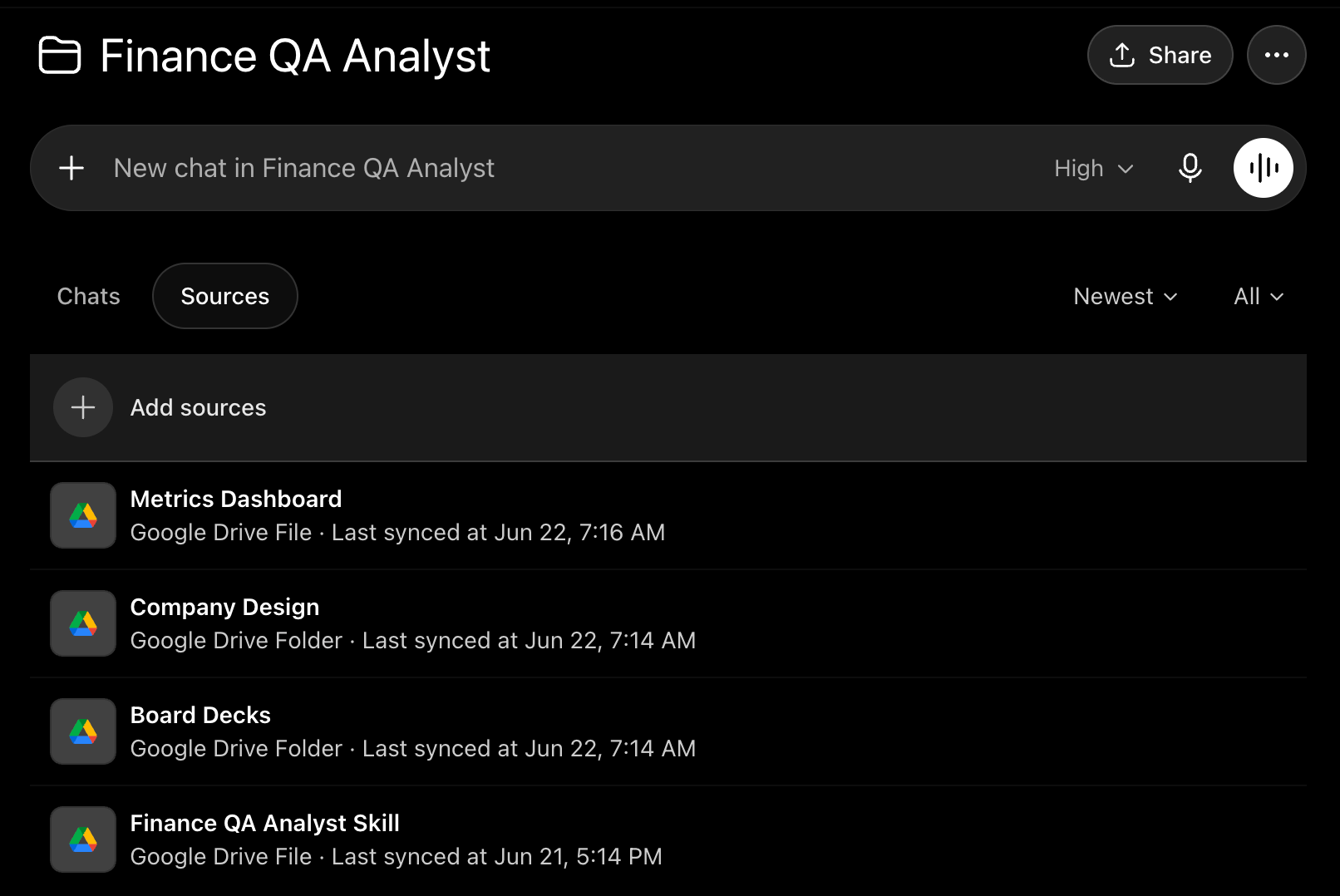
In ChatGPT projects you can upload files or link to Google Drive folders/documents to provide context. There is a lot of context you can provide but below are a few things that I uploaded for my board deck review:
Metrics Dashboard: confirms all board deck numbers agree to our dashboard
Company Design Guidelines: logo, colors, formatting rules, and examples so it can keep materials on-brand.
Board Decks: I provide all prior board decks and have it look at the most recent ones. With this context, the AI agent can compare the current material to other board material. If ARR in Q2 was $52M and now we are showing $51M for Q2, the QA Analyst should flag it and check why previous numbers changed from what was already presented.
MCP Connections:
MCP connections / custom apps are separate from project sources. In ChatGPT, these show up as Apps. Project sources are the files, docs, dashboards, and folders you want ChatGPT to reference inside the project. Apps/MCPs are the external systems ChatGPT can access when they are connected and available in the tools/app menu.
In your Skill/instructions, tell the Finance QA Analyst exactly when to use those connections. Example below:
When reviewing board deck revenue, check the financial report in Snowflake before signing off.
You want to provide fairly tight instructions in the Skill so it doesn’t just go looking everywhere via MCP.
Step 3: Create Your Skill/Instructions
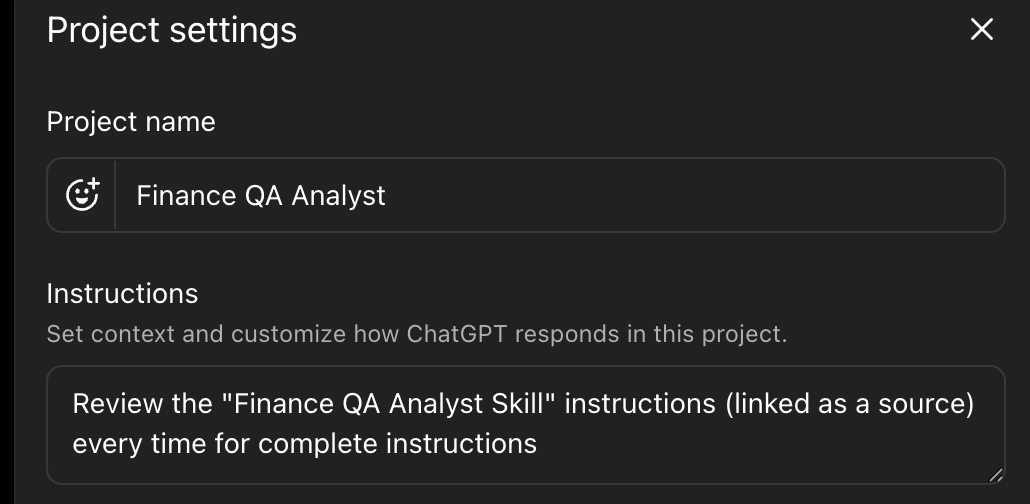
💡 Pro tip: In ChatGPT I put the “Skill” (which ChatGPT just refers to as instructions) in a Google Doc so I don’t have to manually update the Skill/instruction each time. So then as I want to make changes to the instructions I just prompt ChatGPT to update for [X] in the instructions.
In the project settings I just tell it to reference the “Finance QA Analyst Skill”, which is a Google Doc that is linked in the project sources.
Skill/Instructions: Describe what you want the QA analyst to do in your Skill file. Below are a few things I have listed in my Finance QA Analyst:
Internal consistency in numbers - very embarrassing to have the same metric with two different numbers in the board deck
Review grammar and spelling
Review formatting consistency - review prior board material for formatting
Apply company design - reference our marketing company designs that is linked as a source
Confirm numbers from source data - call relevant MCPs to confirm data from ERP, Snowflake, etc
For every important metric, tell the QA Analyst which source wins. ARR might come from Snowflake, cash from ERP, headcount from HRIS, bookings from Salesforce, and budget variance from the planning model. The QA Analyst shouldn’t guess. It should flag mismatches and tell you which source disagrees.
Finance QA Analyst Output Instructions:
It is important to define what and how you want the AI agent to provide feedback. Otherwise you will never read it…
In my instruction file I tell it to be concise and order it in the below categories:
Major issues
Must-fix before sending
Data items not verified
Grammar/spelling
Open questions
Stop Making Stupid Mistakes
I don’t use AI to write anything for my newsletters. I don’t like how it writes and I enjoy the writing process myself. I do use it for research though. And I am now using it for quality review. Let’s see if I make any obvious errors like the Shopify one in the future…
Anyone putting together important materials (board materials, investor updates, exec presentations, fundraising, M&A stuff, etc) should create a smart AI agent to double-check your work.
Use AI to prevent embarrassing mistakes.
Footnotes:
Subscribe and forward this newsletter to your team.
Reply to this email and tell me what AI stuff you want to see