
Brought to you by...goClose

What does every CFO love? An accurate and fast accounting month-end close. Numbers provided in the middle of the next month are much less useful…
Ditch Excel, don’t pay crazy prices for a glorified Excel document, and don’t vibecode a solution that kinda works.
Check out goClose - get a free month-end checklist that includes full workflows, approvals, automations, etc. Also check out its reconciliation platform, flux analysis, and free accounting templates.
In the last OnlyCFO newsletter, I discussed the most expensive cap table mistakes I have seen. The short version is that if you don’t properly track and follow the rules then it can be very expensive and time-consuming to fix. And the longer you wait the more expensive and harder the issues are to fix.
If you have experienced any of these cap table issues, then you will do everything you can to avoid them for the rest of your career.
I am in that boat…
Below are four actually useful ways I have found to leverage AI in cap table management. Lots of time saved and significantly more confidence that everything is accurate.
1. Pending Grant List AI Preparer
Prior to every board meeting, someone on my team (HR/legal/Controller) drafts the list of grants that need to be approved by the board. The below format makes it easy to review and spot-check for concerns (for both me and the board) - “are we hiring too many VP+ folks?”, “is the fully diluted % of grants too generous?”, etc
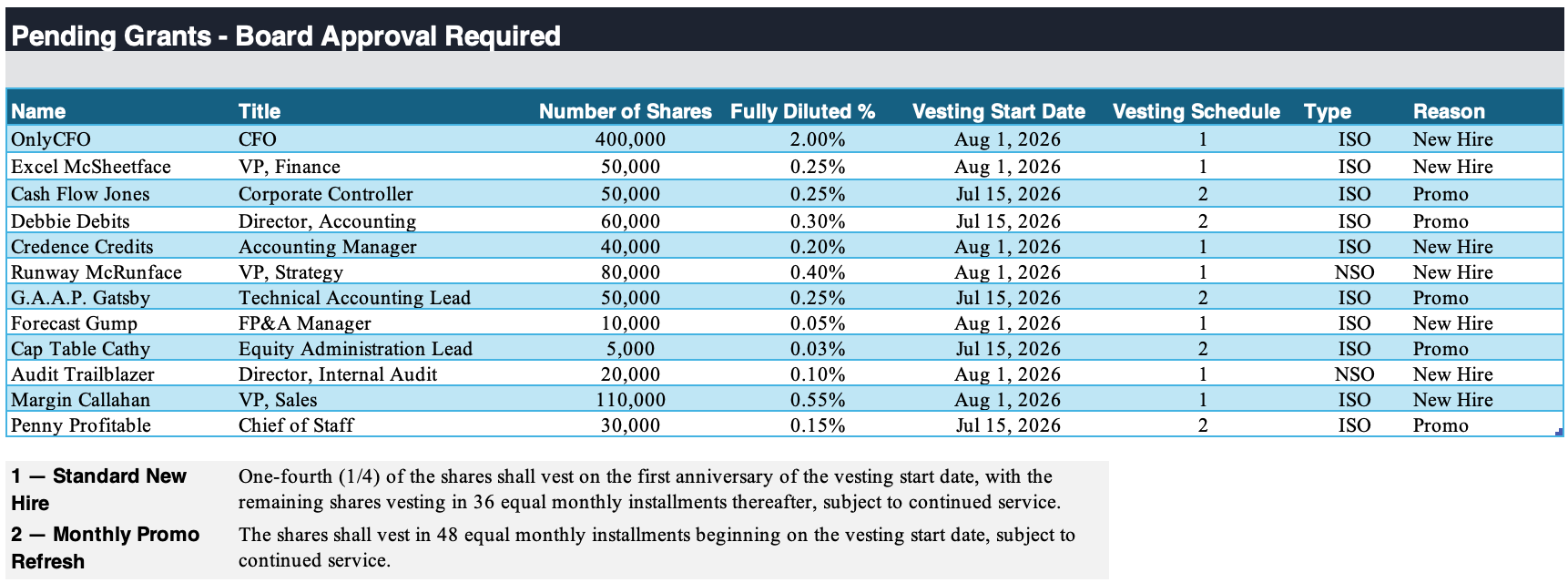
This list isn’t something you want to mess up because if the board approves the wrong thing then it will become difficult (and embarrassing to fix with the board).
How To Use AI To Prepare The Grant List
Create a project “Pending Grant List Creation”
Connect your folder with all new hire offer letters, promo letters, and any other one-off grant letters
Create a skill/instructions on how to create and/or review the pending grant list
If you are having it create the list then it can look at all letters signed since the last board meeting and also do cut-off issue checks to make sure there is no timing issue (ie no pending grants fall through the cracks).
I have seen several fat finger mistakes (eg granting 20,000 options instead of 2,000), entering someone’s name wrong, or putting the wrong year on the vest start date. If you leverage AI to create and/or review the list then these are MUCH less likely.
Want to Make it More Automated?
Crawl: Create a project (like I said above) and manually tell ChatGPT/Claude to create the pending grant list
Walk: Create a “scheduled task” (eg. every Monday at 9am) that pulls from your connected systems and automatically updates/reviews the pending grant list.
Run: Create a trigger (using Zapier, Workato, etc.) so every time a new offer letter is added to the folder, it automatically updates the pending grant list in real time.
The “run” option might be overkill for many things. I use the “walk” approach for almost all equity-related items so I don’t have to remember to prompt Claude. Then it will just slack me either weekly/monthly/quarterly on things I should look at.
2. Equity Reconciliation Agent: HRIS <> Board Minutes <> Carta
This reconciliation can save a lot of equity issue headaches by catching issues early. It should be done at least quarterly.
Control: Confirming all equity grants are approved by the board and that it matches the HRIS and your equity tool (eg Carta)
Without AI: Every quarter/month someone manually compares board minutes of approved grants to what was added to Carta, making sure all start dates, grant size, etc match Carta. And that should match the HRIS (if you put equity data there)
How To Use AI To Perform the Reconciliation:
Create a project “Employee Equity Reconciliation”
Connect your folder/s with 1) board minutes, 2) equity letters (new hire offer letters, promo letters, etc), and 3) HRIS reports (if not connected via MCP)
Create a skill/instructions on what to review, any analysis you want performed, what the output should look like.
The goal is to have AI normalize the three sources and give you an exception report instead of making someone compare every row. For example: grant approved for 50,000 options but Carta shows 500,000; vesting start date doesn't match the offer letter; employee exists in Carta but not HRIS; approved grant is missing from Carta, etc.
Below are all the exceptions that AI found doing this reconciliation.
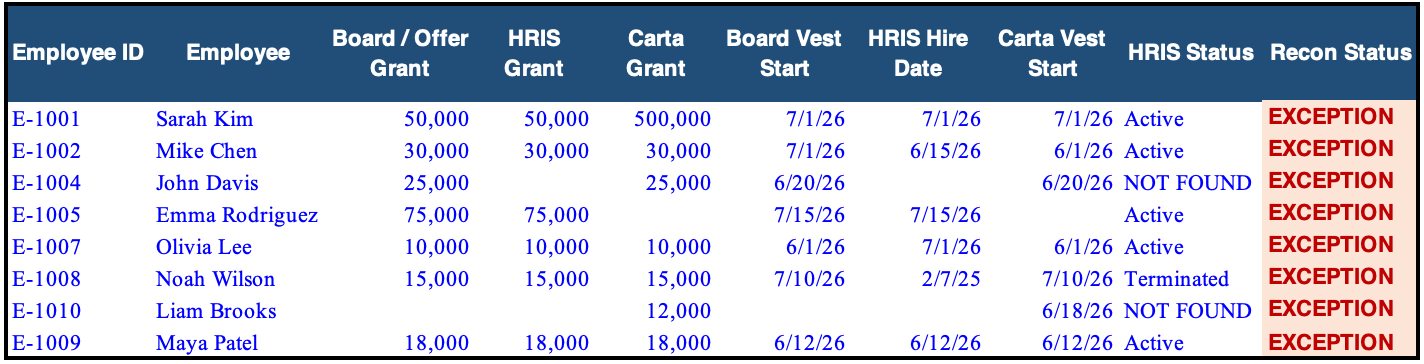
And it’s important to continue to iterate on the skill/instructions. Every time you find a new edge case, add another check. For example, my team found the last issue above (Maya Patel), so we added this check to the Pending Grant List AI Preparer: “Review all pending grants and confirm none were already approved in prior board minutes.”
3. 409A Reviewer Agent
A 409A Valuation Report is performed at least annually, but could be more frequently (fundraising, material event, tender offer, close to an IPO, etc). It’s important to get right because it determines the strike price for all equity grants during the period, impacts employee taxes when they exercise, and your auditors will review it in detail.
TLDR: You don’t want to mess up your 409A report.
The experts preparing the 409A aren’t reviewing most of the inputs. They are just trusting management on historical financials, forecasts, and other relevant data points.
Reviewing this manually is time-consuming and error-prone.
How To Use AI To Review the 409A:
Create a project - “409A Report Reviewer”
Point to the folders with the relevant support for the review (historical financials, forecasted financials, cap table report, secondary transactions, etc)
Connect Carta (or other equity tool MCP) - for the 409A review if you connect to Carta MCP then it can validate the numbers as well and check for secondaries (a somewhat common thing to miss in 409A reports).
Create a skill/instructions for what to review. There are some standard things you always want to review (confirm historical and forecasted numbers tie to your latest reports, all secondaries are included, cap table is accurate, etc).
But maybe there is also an analysis you want performed.

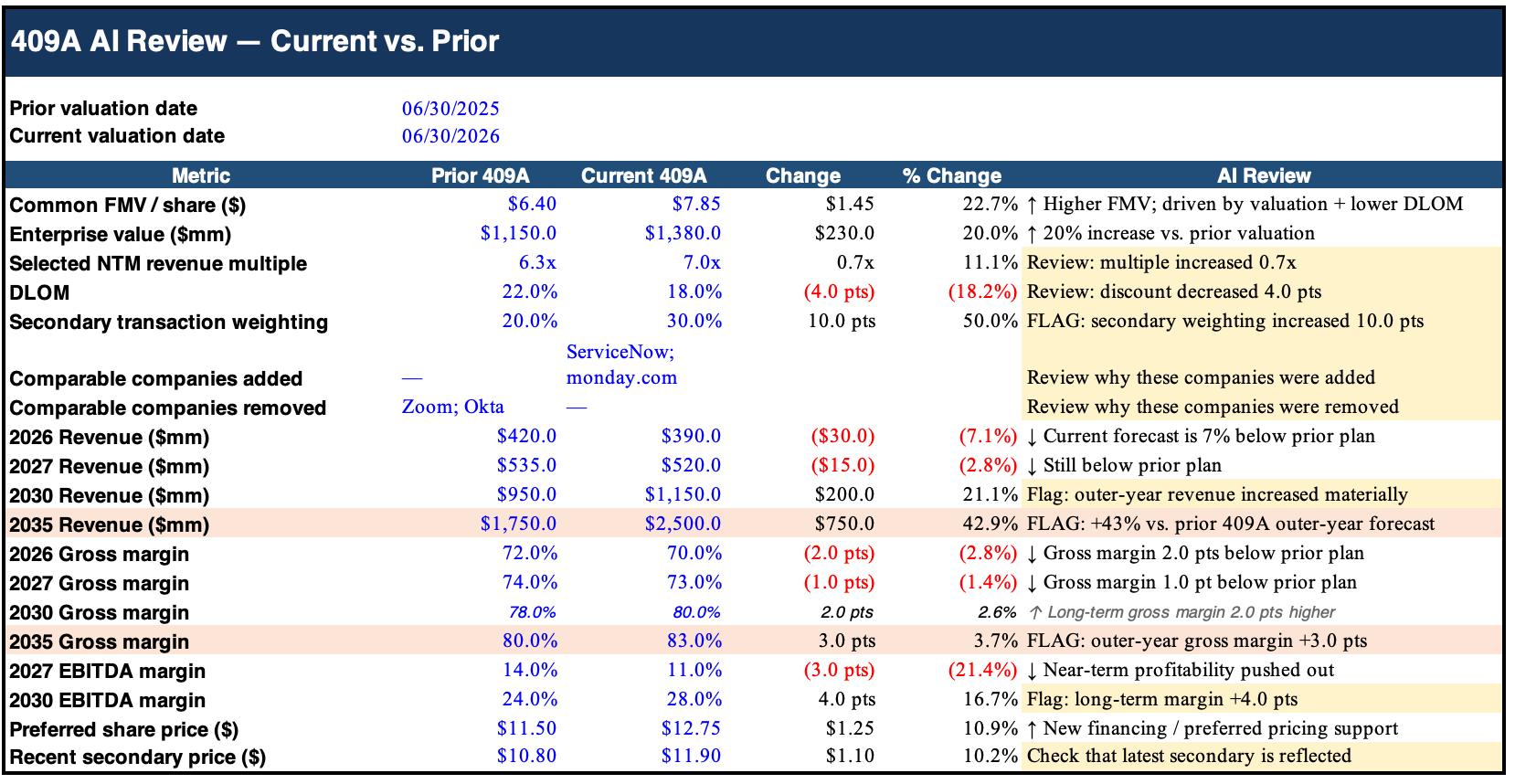
When I review the 409A I always want to compare the forecast from the prior 409A with the current one to see how the assumptions changed. We only build a model for 3 years out, but the 409A goes 10+ years so are outer-year assumptions changing a lot?

I used to do this manually comparing the two 409A Valuation PDFs, but now I have AI build a comparison in Excel in less than 1 minute...
Below is an example of what that analysis looks like:
4. Equity Monitoring Agent
There is a lot to potentially remember when managing the cap table and all equity-related stuff so I created a scheduled agent that updates me every two weeks on things like the following:
“409A expires in [X] days”
Reviews emails and slacks for things that may impact 409A. “You just signed a term sheet for a Series D. Consider pausing additional grants until you have a new 409A completed after fundraising completes”
“Your remaining option pool is 3.8% and if all pending grants are approved your remaining option pool will drop to 2.1%”
“Carta identified these cap-table red flags:”
It can check all of these things because Claude has access to my folders with 409As, Carta MCP, HRIS MCP, etc
Footnotes:
Check out goClose for month-end close (and get a free full month-end close tool)
Reply to this email and tell me what AI stuff you want to see